
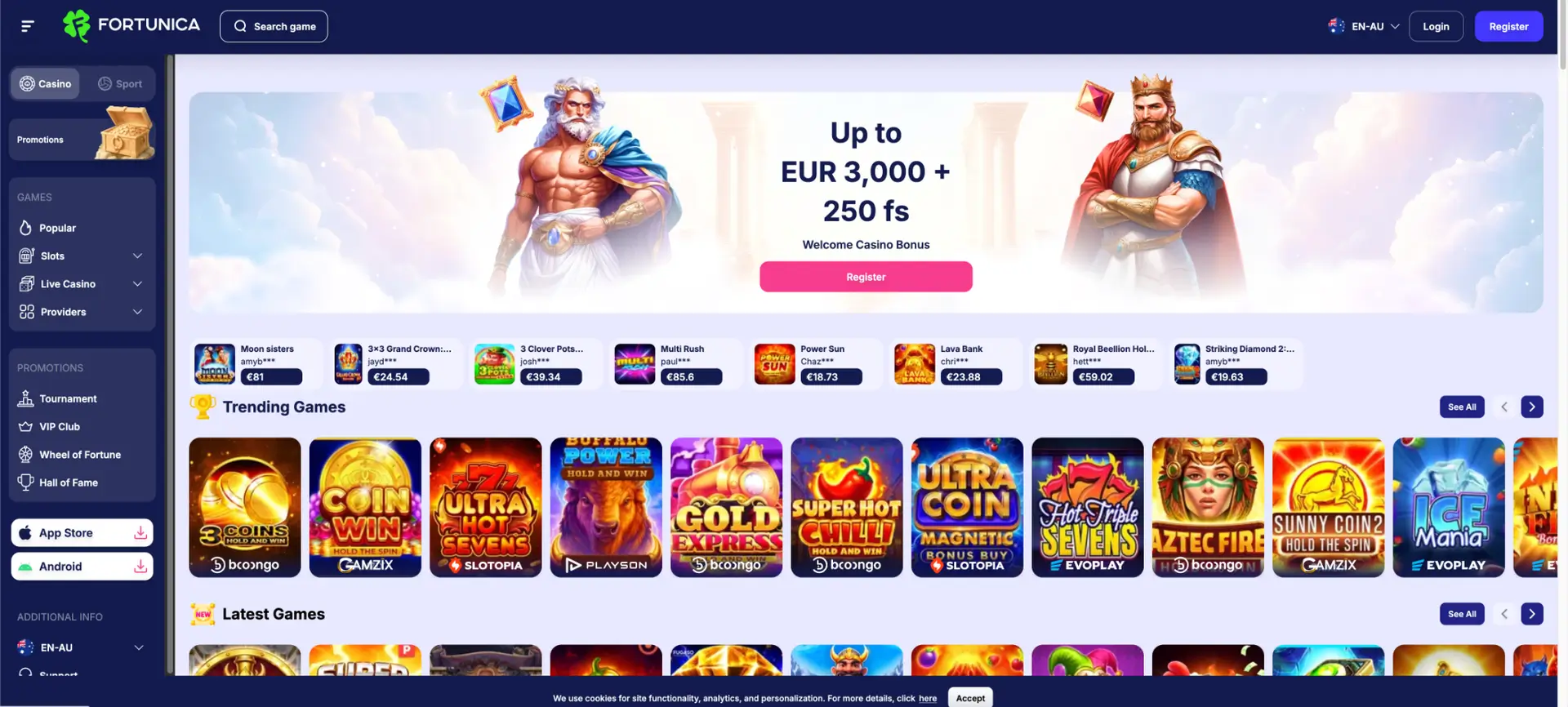
The Fortunica EN-AU interface displays two mobile download buttons: App Store and Android. The supplied screens confirm that the links are present, but they do not confirm the publisher identity, current store approval, Android package signature, download size or minimum operating-system version. Australian users should verify those details before installing any Fortunica app.
The mobile browser version is the best-documented access method in the available material. It carries the same Fortunica login, account registration, pokies, live casino, promotions, VIP Club, cashier and support sections as the desktop site. Access may be restricted in Australia because ACMA named Fortunica in a February 2026 illegal gambling website blocking action.
| Mobile feature | What is confirmed |
|---|---|
| iPhone/iPad button | App Store button visible in the EN-AU sidebar |
| Android button | Android download button visible in the EN-AU sidebar |
| Browser version | Responsive interface with the full navigation structure |
| Login | Email and password form |
| Games | Pokies, live games and provider filters |
| Promotions | Welcome offers, weekly rewards, cashback, reloads, tournaments and wheels |
| AUD account | AUD selectable during registration |
| Cashier | Payment functions available after login; exact method limits depend on the account |
| Australian availability | May be blocked by Australian ISPs |
Is there a Fortunica casino app for iOS?
An App Store button is visible on the Fortunica desktop sidebar. Before treating it as an official iOS listing, open the link from the account interface and check the developer name, privacy information, supported region, age rating and recent version history. Search results can also surface an unrelated astrology app using the Fortunica name, so the app title alone is not enough to verify a casino product.
Is there a Fortunica app for Android?
An Android download button is also shown. Android casino downloads are sometimes distributed as APK files rather than through Google Play. Do not install a file from a mirror, messaging channel or pop-up. Confirm the source domain, inspect requested permissions and keep Android's built-in security scanning enabled.
How to use Fortunica on a mobile browser
- Open a current mobile browser such as Safari, Chrome or Firefox.
- Check the address carefully before entering account details.
- Select Login and enter the registered email and password.
- Use the Casino or Sport tab, then choose Pokies, Live Casino or another category.
- Open the account area for bonuses, VIP progress, cashier and KYC requests.
- Log out after use, particularly on a shared phone or tablet.
How to add browser access to the home screen
iPhone and iPad
- Open the verified page in Safari.
- Tap the Share icon.
- Select Add to Home Screen.
- Check the displayed address before confirming.
Android
- Open the verified page in Chrome.
- Tap the three-dot menu.
- Select Add to Home screen or Install app if the browser offers a web-app shortcut.
- Check the address and icon before adding it.
Mobile features visible in the Fortunica interface
- Pokies: Latest Games, Buy Feature, Megaways and All Slots categories.
- Live casino: Roulette, Blackjack, Baccarat and All Live Games filters.
- Search: game search in the top navigation.
- Promotions: welcome packs, weekly rewards, cashback, reloads and seasonal campaigns.
- Loyalty: VIP Club with 70 levels and seven statuses.
- Competitions: tournaments, Hall of Fame and player-win displays.
- Account: login, registration, bonus activation, currency choice and support.
Fortunica mobile download safety checklist
- Confirm that the download starts from the same domain shown in the account interface.
- Compare the developer name with Fortunica's published operator details.
- Do not disable Play Protect, iOS security controls or browser warnings.
- Reject requests for accessibility access, device-administrator privileges or SMS control unless the function is clearly necessary and independently verified.
- Do not install a second app solely to make a deposit or complete KYC.
- Remove the app and change the account password if an unexpected login, payment prompt or overlay appears.
Login and payments in the Fortunica mobile app
The visible login flow uses email and password, with a Forgot password? link. The payment image shows Visa, Mastercard, Visa Secure, iCheck, Apple Pay and Google Pay branding. Exact deposits, cashout limits and availability should be read in the logged-in cashier because the supplied payment screen does not show amounts.
Fortunica's KYC rules can require photo ID, proof of address, payment-method evidence and a selfie. Upload documents only through a verified secure flow. A legitimate verification process should not ask for a card CVV or a remote-control app.
Australian access warning
Fortunica is not an Australian-licensed online casino. ACMA's February 2026 action means a website or app may be inaccessible from an Australian network. This guide does not provide VPN, mirror-domain or sideloading instructions to avoid that restriction.
Fortunica app FAQ
Can I download the Fortunica app on iPhone?
The interface displays an App Store button. Verify the developer, region and listing before installation because an unrelated Fortunica astrology app also exists in app-store search.
Can I download Fortunica on Android?
An Android button is visible. Use only the verified account link and inspect the file source and permissions.
Do I need an app to use Fortunica?
No. The responsive mobile website provides access to the main casino and account sections.
Can I claim bonuses on mobile?
The promotions and My bonuses controls are available in the mobile-compatible interface. Activate an offer before depositing when its terms require activation.
Can I make a withdrawal from mobile?
The cashier is available after login, subject to KYC, payment ownership and the same-method rule.
Why is the Fortunica app or website unavailable in Australia?
Fortunica was included in an ACMA ISP-blocking action concerning illegal online gambling services.